
Type: Content Original link: https://x.com/skirano/status/1991527921316773931?s=43&t=ANuJI-IuN5rdsaLueycEbA Publication date: 2025-11-24
Summary #
Introduction #
Have you ever wanted to turn a long article or a complex document into something visually appealing and easy to share? Nano Banana Pro might be the solution you’ve been looking for. This tool, which has captured the attention of many with its enigmatic tweet, promises to revolutionize the way we manage and share dense information. But what makes Nano Banana Pro so special? Let’s find out.
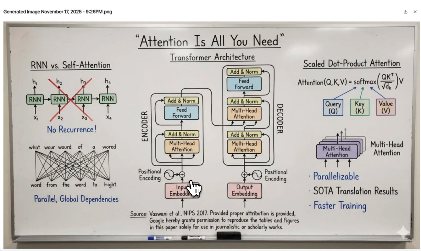
Nano Banana Pro is a tool that allows you to convert long documents and detailed articles into whiteboard images. This not only makes the content more accessible but also does so in a visually appealing way. If you are a developer, a tech enthusiast, or simply someone who works with large amounts of text, this tool could change your approach to managing information.
The Context #
Nano Banana Pro fits into a context where information management has become increasingly complex. With the exponential increase in available information, finding effective ways to synthesize and share data has become crucial. This tool addresses a concrete need: how to make large amounts of text accessible and understandable quickly and visually appealing.
The idea behind Nano Banana Pro is simple but powerful: transforming long documents into whiteboard images. This not only facilitates sharing but also makes the content more digestible. Imagine having to present a research article to a work team. Instead of sending a long PDF document, you can transform it into a whiteboard image that can be easily shared and discussed. This approach not only saves time but also makes communication more effective.
Why It’s Interesting #
Visual Compression #
One of the most interesting aspects of Nano Banana Pro is its ability to compress large amounts of text into detailed images. This is particularly useful for those who work with long documents or complex articles. Instead of having to scroll through pages and pages of text, you can have an overview in a single image. This not only saves time but also makes the content more accessible.
Easier Sharing #
Another significant advantage is the ease with which images can be shared. In an era where visual communication has become predominant, having a tool that allows you to transform text into images is a great advantage. You can easily share your whiteboards on social media, in work chats, or in presentations, making information sharing more effective and engaging.
Practical Applications #
Nano Banana Pro can be used in a variety of contexts. For example, a researcher can transform the results of a study into a detailed whiteboard, making it easier to present the data. A teacher can use it to create visually appealing educational materials. A developer can transform design documents into images that can be easily shared with the team. The possibilities are endless.
How It Works #
Using Nano Banana Pro is surprisingly simple. Just upload the document or article you want to transform, and the tool will take care of the rest. No complex technical prerequisites are required, making it accessible to a wide audience. Once the document is uploaded, Nano Banana Pro analyzes the text and transforms it into a detailed whiteboard image.
A concrete example of use could be transforming a scientific research article into a whiteboard. This not only makes the content more accessible but also does so in a visually appealing way. Imagine having to present the results of a study to a work team. Instead of having to scroll through pages and pages of text, you can have an overview in a single image. This not only saves time but also makes communication more effective.
Reflections #
Nano Banana Pro represents a significant step forward in managing and sharing information. In an era where visual communication has become predominant, having a tool that allows you to transform text into images is a great advantage. This not only facilitates sharing but also makes the content more accessible and understandable.
Furthermore, Nano Banana Pro could open up new possibilities for creating visual content. Imagine being able to transform any document into a detailed image that can be easily shared and discussed. This could revolutionize the way we work, study, and communicate. The tech community is always looking for tools that can simplify and improve workflows, and Nano Banana Pro seems to promise just that.
Use Cases #
- Private AI Stack: Integration into proprietary pipelines
- Client Solutions: Implementation for client projects
Resources #
Original Links #
- Nano Banana Pro is wild - Original link
Article reported and selected by the Human Technology eXcellence team, processed through artificial intelligence (in this case with LLM HTX-EU-Mistral3.1Small) on 2025-11-24 17:37 Original source: https://x.com/skirano/status/1991527921316773931?s=43&t=ANuJI-IuN5rdsaLueycEbA
Related Articles #
- Nano Banana Pro: Gemini 3 Pro Image model from Google DeepMind - Go, Image Generation, Foundation Model
- Next up… Slide Decks! Turn your sources into a detailed deck for reading OR a set of presentation-ready slides - AI
- Introducing MagicPath, an infinite canvas to create, refine, and explore with AI - AI